Custom USB Drives for Car Dealerships: 4 Specs Before a Model-Year Handout
A model-year handout for a car dealership is rarely one box of USB drives. It is one purchase order that has to arrive as dozens of separate cartons, each addressed to a different branch, each holding the right capacity and the right brochure for that store's models. The hard part is not the unit price. It is keeping every branch's drive identical where it should be identical, and different where it should be different. Get the split wrong and you ship 30 stores the wrong price list.
Why a Dealer Network Order Is Not a Single-Event Giveaway
A single-event giveaway - a trade show, a product launch - is briefed once and shipped to one address. A dealer network reverses that. The head office places the order, but the recipients are individual showrooms, and each one serves a different model mix and a different local market. Plan the order as a distribution problem, not a printing problem.
The practical consequence is simple: one artwork master, many destination cartons. The factory can print a single body design and still pack per branch by reading a branch code printed on the carton. You decide once what the drive looks like, and logistics handles who gets how many. That single decision - design once, ship many - is what separates a network handout from a one-off promo.
Lock the Body, Capacity and Packaging at Headquarters
Three things should be set once, network-wide, and not left to individual stores:
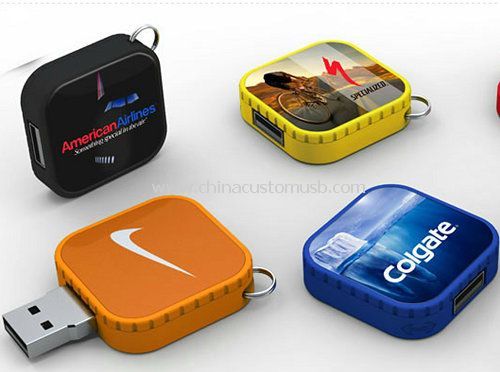
1. The drive body and shape. A consistent body across every branch is what makes the handout read as one brand program rather than 40 unrelated freebies. Pick one neutral shape that survives a showroom desk - a swivel or rotary body means no loose cap to disappear during a handover. A clean example is a square rotary drive: flat, light, and unbranded until your logo goes on it.
2. The storage capacity. Capacity is driven by the content, not by the store, so it has to be one decision made at HQ. A documents-only brochure pack - a PDF per model plus an options-price sheet - fits comfortably in 8 GB with room to spare. Add one 1080p walkaround clip per model and a single clip of two to three minutes is typically 80 to 250 MB, which pushes a multi-model bundle toward 16 GB. A full video set across five or six model lines lands at 32 GB. Note the hard ceiling: FAT32 cannot hold any single file larger than 4 GB, which is exactly the size of a longer 1080p video, so if one clip crosses that line the whole run has to be formatted exFAT instead - decide it before production, not after the drives ship.
3. The outer packaging. One box and one insert-card master, printed with the network logo and a single generic title, keeps the unboxing consistent. Branch-specific text goes on a separate insert or a printed belly band, never on the master carton, so the factory can keep one box in production while swapping only the local slip.
Splitting One Run Across Model Lines and Branch Codes
The split is the part most first-time buyers underestimate. A single production run becomes individually addressed cartons by printing a branch code on each carton and packing per branch; the drive body stays identical across all of them. What changes between cartons is the count and, where you choose it, the local insert.
The control split below is the decision you make once, before the order. Lock the things that must be identical network-wide; leave the things that can vary to the branch; and flag anything that has to match the preloaded content so the factory does not pack a 16 GB drive behind a brochure that needs 32 GB.
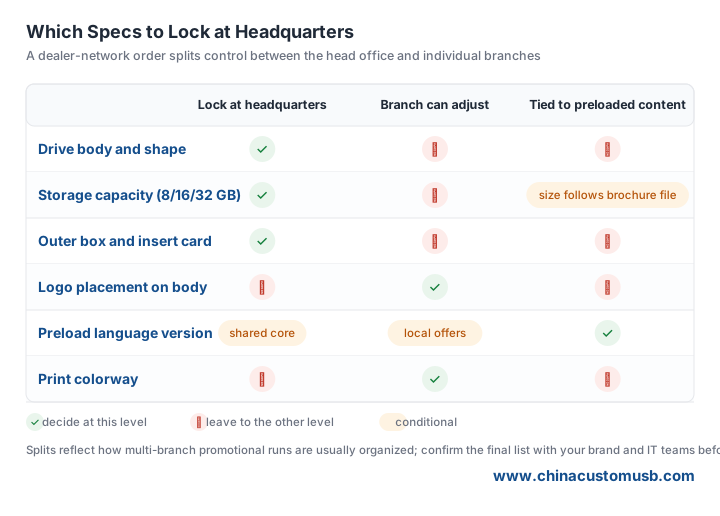
One operational note that saves a redelivery: send the factory a branch list with the model lines and the preload file size for each branch, not just a total quantity. A run packed as "branch A: 200 units of model X, branch B: 150 units of model Y" ships correct the first time; a run packed as "350 assorted" ships wrong and gets opened on a showroom floor.
Preload Rules for Model Brochures and Price Lists
Preloading a dealer network is a cloning job with a per-branch overlay, not 40 separate builds. Build one mastered image that holds the shared core - the brand intro, the network-wide warranty terms, the master model overview - then swap in a named folder per branch that carries that store's local offers and its specific price list. The folder name should match the branch code on the carton, so a mispack is visible at a glance.
Two rules keep the content honest. First, keep the root obvious: one folder per model, a PDF or video named so its purpose is clear, and a plain HTML index that opens in any browser. Auto-run launchers no longer work reliably on current Windows and macOS, so the content has to be self-explanatory without one. Second, test the exact folder structure on a Windows machine and a Mac before the batch ships, because a drive that opens on your laptop but not on a store's locked-down terminal is a recall waiting to happen. Budget the capacity from the previous section so the largest branch bundle fits with headroom.
Handout Points: Showroom Desk, Service Bay and Test-Drive Return
The drive earns its cost only if it reaches a hand, so plan the three moments it is most likely to be given out. At the showroom desk, leave one with every test-drive registrant alongside the printed quote - the drive is the take-home version of the conversation. At the service bay, hand one to service customers as a digital owner's manual and the carrier for any recall or campaign notice, where a brochure would be recycled unread. On the test-drive return, the drive doubles as the follow-up: the same bundle that sold the car becomes the thing that brings them back for the first service.
None of these moments needs a different drive. They need the same drive, correctly split and correctly preloaded, arriving at the right branch with the right content. That is the whole job.
Send your branch list and the file sizes for each model brochure, and we will come back with a split-pack quote plus a preloaded sample drive.
Need custom USB drives for your next project?
Factory-direct pricing, free digital proof and a 7-day sample turnaround.
Get a free quote