Graduation Keepsake USB Drives: Engraving, Box and Capacity Choices
A graduation drive only earns its cost if it is still on a shelf years after the ceremony. Three choices decide that at order time: the body and how it is engraved, the box it arrives in, and the capacity you preload. Each one has a default that looks fine in a quotation and fails in the hand — a printed logo that lifts off a curved wooden face, a poly bag that reads as a spare part, and a capacity picked from the price column rather than from the file set.
Why a Keepsake Outlasts the Certificate
A certificate gets filed. A drive gets used. That is the whole argument for the format: the object that carries the ceremony video also carries the student's own coursework afterwards, so it stays in a drawer that gets opened.
That only holds if the object feels deliberate. A wooden body with a name cut into it does. A plastic capsule with a sticker does not. The practical test costs one sample: hand it to someone who did not place the order and ask what it is for. If the answer is "a free USB stick", the keepsake idea has already failed.
Engraving: What Reads on Wood and What Rubs Off
On a wooden body the finish matters more than the artwork file. Laser engraving removes material, so the mark is recessed and its contrast comes from charring working with the grain; there is no ink edge to lift. UV printing lays ink on the surface and can carry a full-colour crest or a photographic image, but on a curved or oiled face it depends entirely on the primer and the cure the factory runs.

Three questions settle which process you need. Does the artwork contain a photograph or a multi-colour crest? Then it is printing, because laser gives you one tone and no gradients. Will the drive be carried daily or kept in its box? Daily carrying favours laser, since nothing sits proud of the surface to wear away. How small is the smallest text? Below roughly 4 mm cap height, laser lines start to merge on coarse grain and a printed line fills in, so shrink the wording rather than the type.
Placement is where most orders lose the effect. A name on the flat face reads when the drive lies on a desk; the same name wrapped around the edge reads only when someone picks it up. Put the school mark on the face and the graduate's name on the side, and keep artwork at least 3 mm from any edge so the burn does not run over the radius and blur.
The Box Does Half the Work
A keepsake is judged before it is opened. Three box levels cover most school orders, and the difference between them is what the graduate sees in the first two seconds.
A kraft tuck box with a printed label is the cheapest level that still looks intentional; it works when the drive is one item in a larger pack. A rigid two-piece box with a foam or EVA insert is the level most schools land on, because the drive sits at a fixed angle when the lid comes off and cannot rattle in transit. A magnetic-closure box with a printed sleeve is the top level, and it is the one graduates keep as a box.
Two details decide whether the box survives shipping. The insert cavity should hold the drive by its body, not by the connector, so the metal shell takes no load. And the box needs a finger notch or a ribbon pull — a rigid lid with no grip gets opened with a pen, which marks the print on the lid. If the school is posting drives individually rather than handing them out, ask for a mailer that fits the box exactly; a box loose inside a padded bag arrives with crushed corners.
Capacity: What a Ceremony File Set Actually Needs
Capacity is usually chosen from the price break, which is the wrong order. Work from the file set first: a short ceremony video, a photo set, the programme PDF, and whatever the school wants graduates to keep. The matrix below compares four common file sets against the three capacities most school orders sit on.
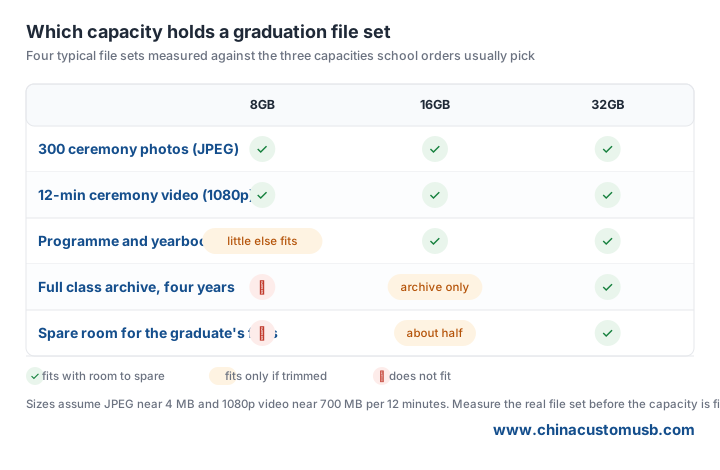
Two practical notes sit outside the table. A drive formatted FAT32 will not accept a single file above 4GB, so a raw camera master has to be re-encoded before preload — decide that before production, not after. And leave the drive unlocked and writable unless the school has a reason to lock it; a read-only keepsake cannot be used for the graduate's own files, which is the reason it stays in circulation.
Working Back from the Ceremony Date
Ceremony dates do not move, so the order has to be planned backwards from one. Four stages sit between approval and a boxed drive in the school's hands: artwork proof and sample, body production and engraving, preload and box assembly, then freight and customs clearance. The engraving stage is the one that cannot be bought faster — a name-per-unit order is machine time.
Ask for the schedule in writing, stage by stage, rather than a single delivery date. Then add the school's own approval time, which is usually the longest and least predictable part: a name list from the registrar arrives late, gets corrected twice, and every correction reopens the proof. Freeze the name list before the sample is approved, and treat later additions as a separate small run.
The Five-Line Order Sheet
School orders fail on missing information, not on price. Send these five lines with the enquiry and the quotation comes back usable:
1. Quantity and split. Total pieces, plus how many per class or per department if the boxes are labelled separately.
2. Body and finish. Wood species or body style, colour, and whether the mark is laser or printed.
3. Artwork files. Vector for the logo, plus the name list in a spreadsheet with one column per line of text.
4. Box level and packing. Which of the three box levels, and whether drives ship boxed per graduate or bulk to the school.
5. File set and capacity. The actual files, or their total size and the largest single file, so capacity and format are decided together.
If you are ordering for a ceremony this term, send the name list and the file set together and ask for a wooden sample with your own artwork engraved on it — the sample answers the two questions a quotation cannot, which is how the mark reads on grain and how the drive sits in its box. Wooden USB flash drives for school and class orders are quoted per project; request a sample and a quote with your quantity and ceremony date.
Need custom USB drives for your next project?
Factory-direct pricing, free digital proof and a 7-day sample turnaround.
Get a free quote

