Wooden USB Drives for Wedding Photographers: Deliver Photos in a Keepsake Box
A wedding gallery sent as a download link disappears into an inbox within a week. A wooden drive in a printed box sits on a shelf for years, gets handed to parents and grandparents, and carries your studio name every time somebody opens it. That is the reason photographers order them: the deliverable keeps working long after the wedding day is over.
Why Photographers Are Moving Beyond Download Links
Cloud delivery solved transfer, not handover. A link has an expiry date, a password, and a storage bill attached to it, and the couple ends up forwarding a URL that has already stopped working. A physical drive removes those steps: the files are already inside the object you hand over.
There is also a commercial reason. A branded wooden drive travels to the couple home, then to the parents, then to a friend who is planning a wedding. Every one of those moves is a referral touchpoint a download page never gets.
A body that looks good in a flat-lay photo is not automatically one that holds a full-resolution gallery and opens on a MacBook. Three decisions carry the order: the wood and engraving, the capacity, and what gets preloaded before the box is sealed.
Choosing Wood, Capacity and Engraving That Photographs Well
Wood grain is the entire visual appeal, so pick a species that reads clearly at small size in a photo. Bamboo shows a fine, straight grain and takes a dark burn with high contrast, which is why it photographs well on a white table. Walnut and maple give a softer, warmer tone that suits film-style editing. Avoid heavy dark stains if the logo is thin: the engraving line disappears into the grain at thumbnail size, and the drive looks blank in your Instagram grid.
Engraving depth matters more than most buyers expect. A laser pass of roughly 0.2 to 0.5 mm gives a mark you can feel with a fingernail, which is what makes a wooden drive feel manufactured rather than printed. Deeper burns char the edge and leave a brown halo around thin letterforms; shallower passes fade after a few months of handling. Keep the approved sample as the reference for the production run.
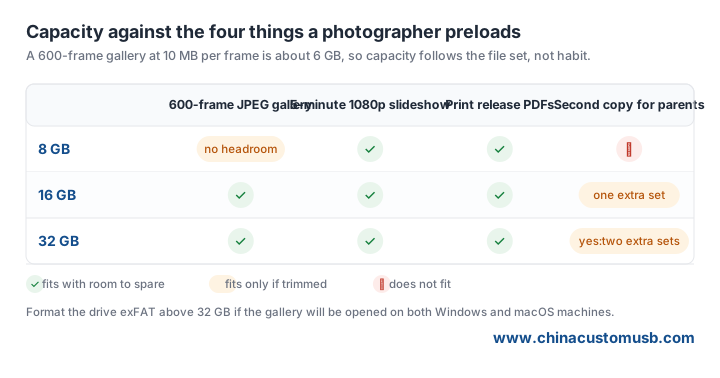
Capacity should follow the file set, not habit. A 600-frame gallery exported at about 10 MB per frame is roughly 6 GB, so 8 GB leaves almost no headroom, 16 GB covers the gallery plus a slideshow, and 32 GB is the comfortable choice when the couple also wants a second copy for the parents. Do not go below the size that fits the real export, because a drive that arrives full reads as an afterthought.

What to Preload: Galleries, Slideshows and Print Releases
Preloading is where the drive stops being a blank object and becomes the actual deliverable. Load four things, in four folders with plain names: 01-Photos, 02-Slideshow, 03-Print-Releases, 04-Read-Me. Numbered folders sort correctly on every operating system, which matters when the person opening the drive is a grandparent rather than a client with a calibrated monitor.
Export the gallery for screen viewing, not for print. Full-resolution JPEGs at 3000 px on the long edge are plenty for a 4K screen and keep a 600-frame set inside 6 GB. Put print-ready files in a separate folder so nobody has to guess which version goes to a lab.
The slideshow should be an H.264 MP4 at 1080p. A five-minute piece at a normal bitrate lands around 300 to 450 MB, which fits beside the gallery on a 16 GB drive without squeezing it. Test the file on a Windows laptop and a Mac before the run, because a codec that plays in your editing suite is not proof that it plays in a living room.
File system is the quiet failure point. FAT32 cannot hold a single file larger than 4 GB, so a long slideshow or a zipped archive can fail to copy at the last minute. exFAT removes that ceiling and reads on both Windows and macOS, which is the reason it is the usual choice for delivery drives above 32 GB.
Packaging the Handover: Wooden Box, Thank-You Card and a Backup Copy
The box is part of the product. A sliding wooden box with a foam or felt insert protects the drive in transit and gives the couple something to reopen. A printed sleeve is cheaper but flattens in a bag, so choose according to how the drive is presented: handed over, posted, or left on a reception table.
Include a small card with three lines: what is on the drive, how to open the slideshow, and where to ask for a replacement if the drive is lost. Put your studio name and the wedding date on the card, not just on the drive, because the card is what gets kept in a keepsake folder.
Keep one copy. Load a second drive for the studio archive before you post the box, because once it leaves your hands it is out of your control and replacing a lost gallery two years later is not a conversation you want to have.
Ordering for the Season: Samples, Timing and Quantity
Order one sample with your real artwork before the season starts, and check three things on arrival: the engraving contrast under indoor light, the actual usable capacity reported by the operating system, and a full write test with your own gallery. Usable capacity always reads lower than the label because of formatting overhead, but a 16 GB drive should report somewhere near 14.9 GB, not 7.4 GB.
Quantity follows your calendar, not a round number. Count the weddings you have already booked in the next quarter, add a few spare drives for reshoots and lost boxes, and order that many. One block for the year also means a single wood batch and one engraving setup, instead of a new laser setup and a different grain every month.
Decide the packaging at the same moment as the drive: the insert is cut for the body you chose, and a box ordered separately is the usual cause of a drive that rattles.
Start with a sample of the wood body and the engraving depth you want, load one real gallery onto it, and hand it to somebody who has never seen your workflow. If they can find the photos and play the slideshow without asking a question, the spec is right. Browse the wooden USB flash drive range to compare body shapes, then send your artwork for a proof.
Request a free sample and quote with your capacity, wood preference, engraving artwork and box style, and we will come back with a spec you can test before you commit to a production run.
Need custom USB drives for your next project?
Factory-direct pricing, free digital proof and a 7-day sample turnaround.
Get a free quote

