Fake 128GB Drives: A 20-Minute Capacity and Speed Test Before Bulk Payment
A buyer just received 2,000 drives labelled 128GB. They copy a 6GB folder onto one, unplug it, plug it back in, and the folder is full of corrupted files. The drive reported 128GB, but it actually looped back and overwrote data past a few gigabytes. This is the single most common "too good to be true" bulk-order failure, and it is detectable with tools already on your computer — before the final payment clears, not after.
Why a drive reports 128GB but overwrites past a few GB
Fake-capacity drives carry a controller that lies about the NAND size to the operating system. The file table says 128GB, so Windows happily writes to it. But the real memory may be 8GB. Once you pass the real boundary, the controller wraps writes back to the start, silently corrupting earlier files. Nothing crashes; the files just break. The fix is not to trust the label — it is to write real data and read it back. The first external red flag is usually price and capacity together: a listing offering 1TB at the price of a genuine 32GB is worth suspicion, but price alone is never proof, which is exactly why the write test below matters.
Test 1 — write large files until the drive stops accepting them
On Windows, open the drive and copy a few large files (single 4–8GB video files work well) until the available space should be exhausted. Use one or two very large files rather than thousands of small ones; small files fragment and can hide the wrap point. Watch the copy progress bar — on a fake drive it may finish almost instantly or report success while the data never actually landed. A genuine 128GB drive will accept roughly 118GB of user data (the rest is taken by formatting overhead); a fake one will either refuse writes early or, worse, appear to accept them and corrupt them. On macOS, do not pre-format and hide the fault — test first, then decide. The decisive sign is whether the drive keeps accepting files past the point its real memory should be full.
Test 2 — read the files back and compare checksums, not names
Copying files back and seeing the right names proves nothing; the fake controller serves the names from its table. What proves capacity is a checksum. On Windows, run certutil -hashfile filename MD5 on the original and the copy; on macOS, shasum filename. If the hashes differ, the data changed in transit — the drive is looping. Do this on at least three files spread across the claimed capacity, including one written near the end. When in doubt, the checksum test is the final arbiter: file names and sizes can lie, a matching hash cannot.
Reading the result — fake capacity, downgraded chips, or a slow controller
Three distinct faults produce similar complaints, and the tests above separate them:
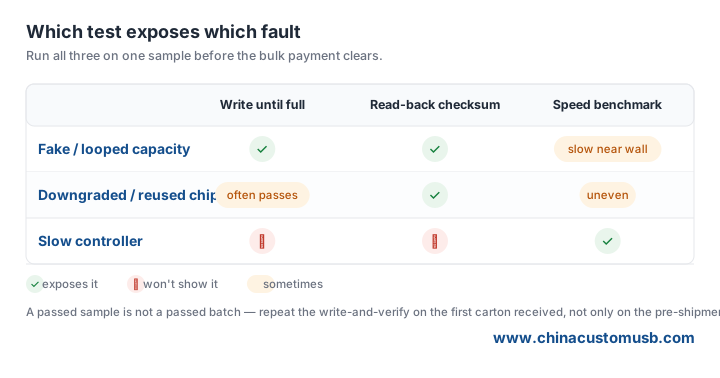
Fake / looped capacity fails the write and the checksum test. Downgraded or reused chips often pass the write test but fail checksums intermittently and show uneven speed. A slow controller passes both data tests but benchmarks far below the rated speed — annoying, not fraudulent.
Put the same test into your incoming inspection sheet
Do not run this once and forget it. Write the three-step check into the incoming inspection for every batch: write until full, checksum three files including one near the end, and benchmark one sample. Keep a screenshot of the checksum output next to the batch lot number; that screenshot is the only evidence that survives a dispute months later. A passed sample is not a passed batch — repeat the write-and-verify on the first carton received, not only on the pre-shipment sample the factory sends you.
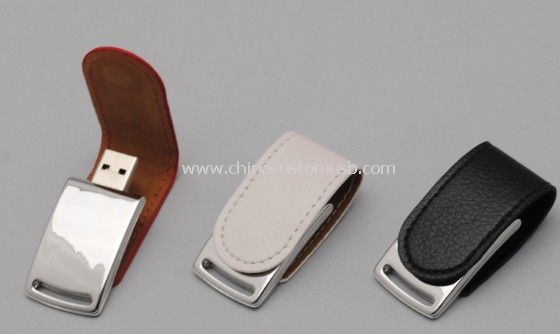
If you want a model that ships with a printed leather finish and a low MOQ for samples you can test before committing, the Mini Leather drive below is a common choice for inspection-friendly small runs:
Before you release the final payment
Ask for a full-capacity write-and-verify report on the exact sample you approve, before the bulk run starts. Ask the factory for its own capacity report on the pre-shipment sample, then repeat the test on a unit pulled from the first delivered carton — the two should agree before you sign off. If the supplier cannot show you a checksum-verified write to the claimed capacity, do not release the balance. Send us the rated capacity and the sample you plan to approve; we will quote a controller and NAND grade that we can verify to that capacity, sample first.
Need custom USB drives for your next project?
Factory-direct pricing, free digital proof and a 7-day sample turnaround.
Get a free quote