FAT32 vs exFAT vs NTFS: Which Format for Your Custom USB Drive?
Every few months a buyer writes back with the same complaint: the drives arrived, the logo looks right, but the video file on them will not copy. Almost always the drives are fine. The format is wrong for the job.
We pre-format every bulk order before packing, and the choice of file system is one of the few decisions made at the factory that a customer can still get wrong at the briefing stage. This guide covers what each format does, where it breaks, and what we ship by default.
What each format actually is
FAT32 is the oldest of the three and the most widely understood by hardware. Anything with a USB port made in the last twenty years can read it: Windows, macOS, Linux, smart TVs, car head units, printers, industrial controllers. Its limitation is famous and absolute — a single file cannot exceed 4GB.
exFAT was designed by Microsoft specifically for flash media. It removes the practical file size limit, keeps the simple structure that makes flash drives efficient, and both Windows and macOS read and write it natively. The trade-off is age: devices built before roughly 2009, and a long tail of cheap media players, still do not recognise it.
NTFS is the Windows native file system. It adds journaling, permissions, and file compression, which matter on a hard drive that stores an operating system and very little on a promotional USB stick. macOS can read NTFS out of the box but cannot write to it without third-party software, and most televisions and car audio systems ignore it entirely.
The 4GB ceiling: where deliveries actually break
The 4GB limit sounds like a technical footnote until you look at what buyers preload. A single 1080p product video runs 1.5 to 3GB. A disk image for a software installer often exceeds 4GB. Design asset packs, raw photo libraries, and training video bundles routinely pass it.
FAT32 also has a second, quieter limit that catches people out: the built-in Windows formatter refuses to create FAT32 volumes larger than 32GB, even though the file system itself supports far more. That is why a 64GB drive sometimes arrives formatted as exFAT without anyone asking — the tool simply would not do otherwise.
If your content is documents, slides, PDFs, and images under 4GB each, FAT32 will never cause a problem. If any single file crosses that line, it is the wrong choice regardless of capacity.
Compatibility, device by device
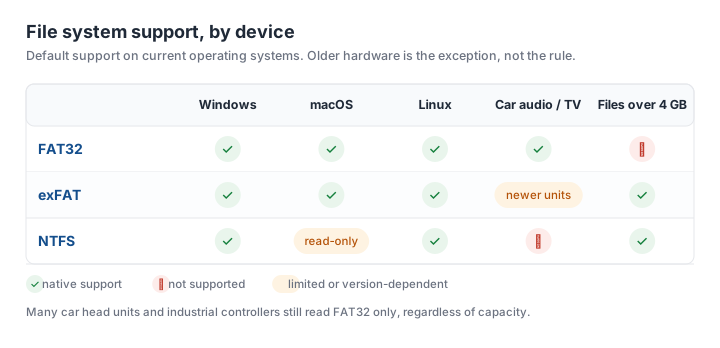
- Windows PC: all three work fully.
- macOS: FAT32 and exFAT read and write; NTFS reads only unless you install a driver.
- Linux: all three work; exFAT needs the exfat-fuse package on older distributions.
- Smart TV and media players: FAT32 is safest, exFAT works on most sets made after 2015, NTFS is hit and miss.
- Car audio and head units: FAT32 is the only dependable option, and some units also cap capacity at 32GB.
- Printers, CNC machines, industrial controllers: FAT32, almost without exception.
The pattern is consistent: the more specialised the device, the more likely it only understands the oldest format.
Does the format affect speed or lifespan?
Less than most buyers assume. Sequential read and write speed is determined by the controller and the NAND flash, not by the file system. A slow drive stays slow after reformatting.
The one measurable difference is write amplification from journaling. NTFS records metadata changes in a log, which means more small writes to the same cells. On a drive that is rewritten daily for years this is worth considering; on a promotional drive that is written once at the factory and read a few hundred times afterwards, it is irrelevant.
What does affect lifespan is how the drive is used after delivery. Pulling a drive without ejecting, leaving it in a hot car, and repeatedly filling it to capacity all shorten life more than the choice between FAT32 and exFAT.
What we ship by default, and how to change it
Our standard practice is FAT32 on drives of 32GB and below, and exFAT on 64GB and above, because that is the combination that produces the fewest support tickets across consumer devices. Every drive is formatted, labelled, and content-tested before packing.
If your audience or your content calls for something else, say so in the order brief. We can pre-format to exFAT at any capacity, set the volume label to your brand name so it appears correctly in file explorers, and preload your files after formatting rather than before. The sequence matters: formatting a drive that already contains content erases it.
One last detail worth specifying: the volume label. A drive that appears as UNTITLED or NO NAME in a customer's file browser wastes the only branding impression the hardware makes before it is opened. We set it to your company or campaign name by default when you tell us what to use.
Not sure which format fits your content? Send us the file list and the devices your recipients use, and we will confirm before production starts rather than after the cartons are sealed.
Need custom USB drives for your next project?
Factory-direct pricing, free digital proof and a 7-day sample turnaround.
Get a free quote