USB Flash Drive vs SD Card for Client Handouts: Which One Gets Kept and Read
Give a client a USB flash drive when the handout has to be read on a laptop within ten seconds of opening the envelope. Give an SD card only when the recipient owns a device with a slot and the file is meant to stay on that device. For a general client handout the drive wins on three counts that matter at the event: it plugs into almost every laptop without an adapter, it has a flat face you can print on, and a cap or lanyard keeps it attached to a badge. This article sets the two formats against each other on those practical points so you can order the right one in bulk.
Start With the Device the Recipient Will Actually Use
Before you compare unit prices, write down where the file will be opened. A trade show visitor carries a laptop with a USB-A or USB-C port. A photographer carries a camera with an SD slot. A conference attendee may only have a phone, in which case neither format works without an adapter and a QR code to a landing page is the better giveaway.
Ask the event organiser what the majority of attendees carry. If the answer is a laptop, the drive is the default. If you cannot get an answer, price both but order the format with the wider print area, because an unreadable handout and an unbranded handout both end up in the bin. Record the decision in the purchase order so the factory does not substitute a cheaper housing without telling you.
Plug-and-Play, Print Area and Loss Risk Compared
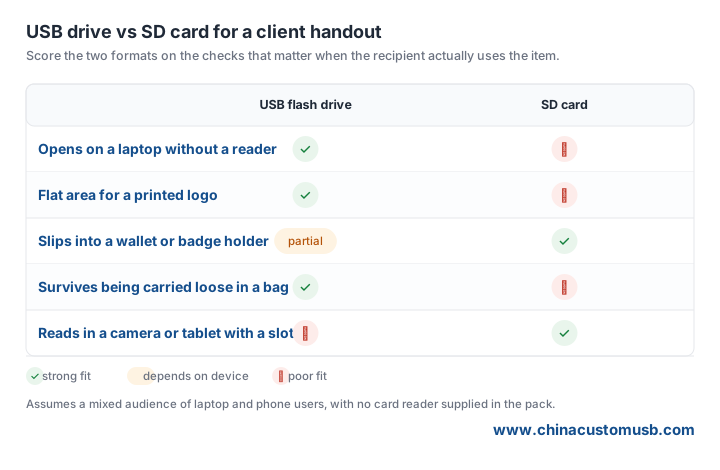
Three differences decide most handout orders. Plug-and-play is the obvious one: a drive connects directly to a laptop, while a card needs a slot or a reader that the recipient probably did not bring. Print area is less obvious but just as important. A standard ABS drive body offers a flat face roughly the size of a business card, enough for a logo and a short URL. A bare SD card has a narrow white strip, and most of the surface is a contact label you cannot print across without damaging the card.
Loss risk is the third. A drive with a cap, a keyring loop or a lanyard hole stays on a badge or a set of keys. A loose card is roughly the size of a postage stamp and disappears into a pocket or a laptop case. The matrix below scores both formats on these checks, plus the one case where the card wins.
When a Card-Shaped Drive Beats Both Formats
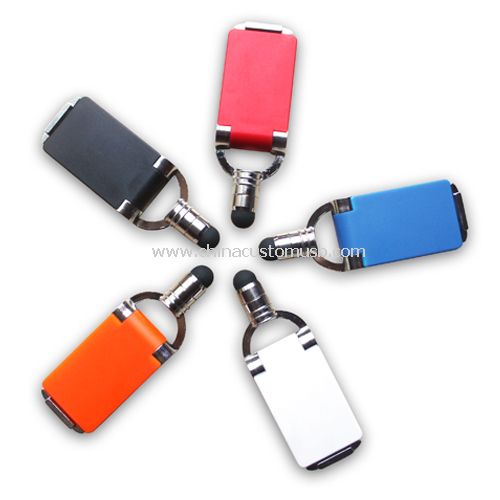
There is a third option worth pricing if the handout is going into a lanyard pack: a card-shaped drive. It carries the USB plug of a drive but the flat rectangle of a card, so it slides into a badge holder and still opens on a laptop. The trade-off is unit cost and thickness. A card-shaped shell is usually thicker than a slim drive and will not fit a standard card sleeve, so confirm the sleeve dimensions against a physical sample before you approve the artwork.
For bulk orders the standard ABS body remains the workhorse. It is the shape most factories keep in mould, which means lower tooling cost and a shorter sampling step. Ask the supplier which body is in stock rather than asking for a custom shape, and you will usually get a sample within the week. A printed logo on a stock body will still look like a branded gift; a custom shape mainly buys you a different silhouette at a higher unit price.

Five Checks to Put in the RFQ Before You Order
Send the same five lines to every supplier so the quotes are comparable:
- Form factor and port. State USB-A or USB-C, and whether the cap is attached. A detachable cap is the most common loss point.
- Capacity and usable space. Ask for the formatted capacity, not the raw chip size, and request a screenshot of a full-format test on a sample.
- Print method and area. Give the artwork as a vector file and ask for the exact print dimensions in millimetres. One-colour pad print is the cheapest; full colour needs a different body.
- Packing. Specify individual polybag, lanyard thread and carton count. A handout that arrives loose in a bulk bag costs an hour of labour per thousand to repack.
- Sample before deposit. Pay for three samples, plug them into two different laptops, and keep one as the golden sample to compare against the first production carton.
None of these checks need a laboratory. They need a written spec and a factory willing to confirm it in the quote. If a supplier will not put the print area and the packing in writing, treat the low unit price as provisional.
Buying Checklist and Next Step
Order the drive for a laptop audience, the card only for a device with a slot, and the card-shaped drive when the giveaway lives on a lanyard. Whichever you choose, lock the print area, the capacity test and the packing into the RFQ before the deposit, and compare the first carton against the golden sample. Send us your file type, logo and target quantity and we will return a quote for all three formats with the print area and packing written into the line items.
Need custom USB drives for your next project?
Factory-direct pricing, free digital proof and a 7-day sample turnaround.
Get a free quote