Best Promotional USB Drives in 2026: A Buyer's Shortlist by Budget
The drive is rarely the part of a promotional giveaway that fails. What fails is the body: the cap that will not stay on, the swivel pin that snaps, the print that rubs off in a pocket. Buy on those three points and the price tier sorts itself out; buy on capacity per dollar and you will be reordering in eight months.
Below is our shortlist by landed unit cost: one recommendation per band, the trade-off attached to it, and the notes we give buyers who ask for a quote. If none of the five bands fits, the wider promotional USB drives range is the place to start.
Five criteria that decide whether the drive survives the year
Body material before capacity. A 4GB drive in a solid ABS shell outlives a 64GB drive in a thin one. Capacity is the cheapest specification to add and the one recipients check least. If the budget is fixed, spend it on the shell.
Joint quality. Failures cluster at three places: the cap, the swivel pin, and the seam where two halves are joined. Ask for the assembly method in writing — ultrasonic welding holds, glued seams open in heat.
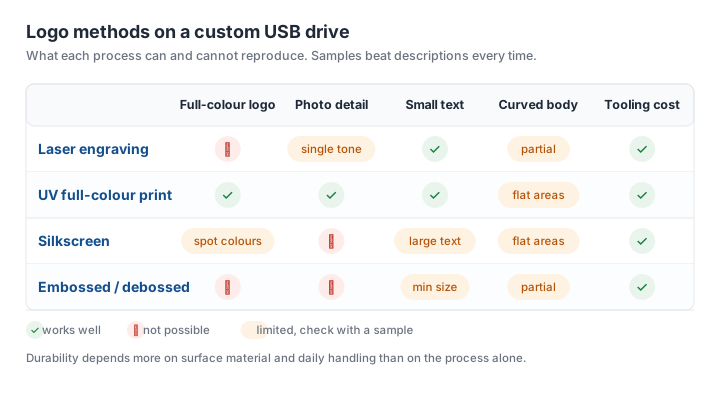
Print method matched to surface. Laser marking on anodised aluminium is permanent. UV print on a curved glossy body looks sharper on day one and wears at the edges. Silkscreen is a spot-colour process: it cannot reproduce a photograph. The matrix below is the short version of what each process can and cannot do.
USB 2.0 or 3.0. USB 2.0 signalling tops out at 480 Mbit/s and delivers roughly 10 to 20 MB/s in practice, which is fine for a PDF catalogue and painful for a 3GB video. USB 3.0 in a cheap plastic body often performs far below its label, so if speed is the selling point, ask for a read/write test on the actual batch rather than the controller name.
Preload and format. FAT32 cannot hold a file larger than 4GB, which is exactly the size of a 1080p launch video. Decide it before production; reformatting 5,000 drives on arrival is nobody's plan.
Under $1 and the $1-2 band: what the volume tiers buy
At the bottom of the market the body is a stock shape, the tooling is zero, and the logo is printed or laser-marked on a surface the factory already has. That is not a compromise to apologise for — a clean one-colour mark on a well-moulded clip drive reads as more considered than a muddy four-colour print on a novelty shape.
What this band cannot give you: a custom 3D body, a metal shell, individual gift boxes, or a capacity above the entry sizes without eating the whole budget. If any of those are on the brief, the next band up is cheaper than forcing this one.
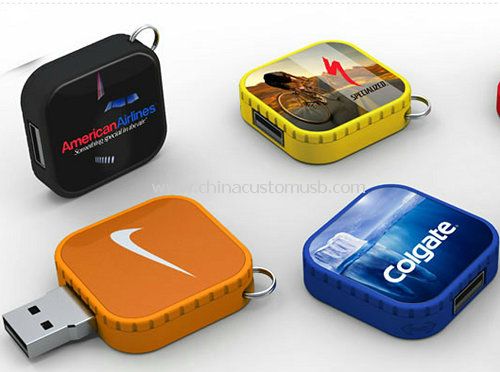
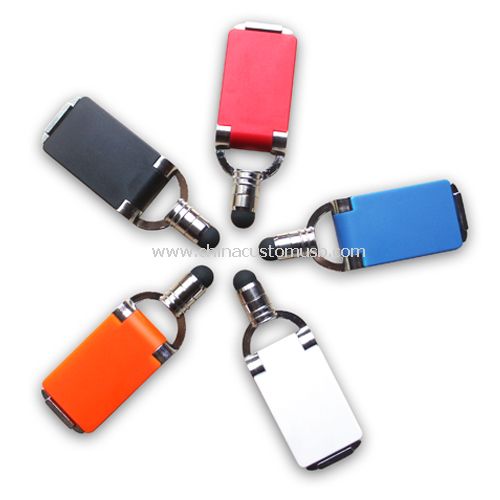
The $1-2 band is where most repeat orders land, because it buys a body that survives handling and a print that survives pockets. A small clip drive is the archetype: no cap to lose, a flat face large enough for a legible logo, and a body light enough that shipping cost per unit stays low. The trade-off is that a clip body offers a small print area, so fine detail and long taglines will not read — plan artwork at the size it will actually be printed.
The $2-4 tier: metal bodies and boxed presentation
This band buys two things the cheaper tiers cannot: a metal shell and a presentation box. Metal matters for two reasons beyond appearance — laser marking on anodised aluminium does not wear off, and a metal body does not soften in a hot car or a warehouse mezzanine.
A drive with some weight also reads as an object rather than a freebie, which is the difference between a drawer and a bag.
Two trade-offs to price in. Metal bodies cost more to ship because of weight, which matters at volume. And a metal shell is usually a stock extrusion with a laser-marked insert, so no bespoke silhouette — that needs tooling.
Above $4: packaging and preloading do the work
Past this line the drive stops being the product. What the buyer is paying for is the unboxing: a rigid box with a foam insert, a printed sleeve, a card, sometimes a ribbon. Preloaded content becomes part of the deliverable rather than an afterthought.
Preloading is where premium orders quietly go wrong. Auto-run launchers no longer work reliably on current Windows and macOS, so the content has to be obvious without them: one folder at the root, a PDF or video named so the purpose is clear, and a plain HTML index that opens in any browser. Test the exact folder structure on a Windows machine and a Mac before the batch ships, not after.
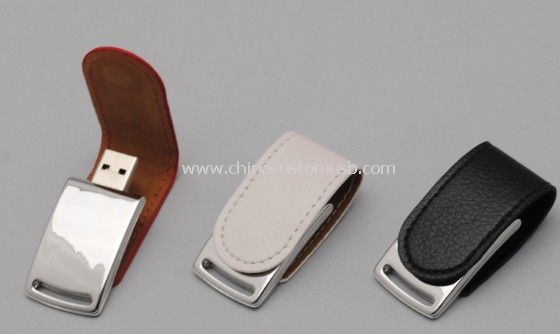
A leather-wrapped body is the usual choice here for corporate gifts: it takes a debossed logo and hides handling marks that show on gloss.
Gulf market notes: heat, humidity and warehouse storage
Three points come up on nearly every Gulf order, and all three are about the body rather than the electronics.
Heat. Flexible PVC softens at temperatures well below what a closed container reaches when it sits in direct sun, and the softened body can deform or take a permanent set in the packaging. For summer deliveries, specify a rigid body — ABS, aluminium, leather over a hard shell — or ask for a higher-heat PVC compound rather than the standard one. Do not leave that decision to the factory's default.
Adhesive labels. Any label-based branding will lift in a hot warehouse. Print or mark directly on the body.
Storage before the event. Drives stored in an air-conditioned warehouse and then moved to an outdoor activation pick up condensation. Silica gel in the master carton costs very little and prevents the 'it does not work' reports that follow a humid launch week.
When a USB drive is the wrong giveaway
Sometimes the honest answer is no. Do not order drives if the audience is under 25 and mostly on phones with no USB-A port — a QR code card or a cable-free transfer link will be used and a drive will not. Do not order them if the content is a single landing page; the drive adds nothing a link does not. And do not order them for a one-day event with fewer than a few hundred attendees, where the setup cost per unit outweighs the impression.
Where a drive does win is the case it was built for: content big enough that a download is a nuisance, an audience that keeps things, and a physical handover moment where the object is part of the message.
If you know your quantity, your event date and which band you are aiming at, send those three numbers and we will come back with a configuration and a production slot rather than a catalogue. Get a quote for your quantity and budget tier.
Need custom USB drives for your next project?
Factory-direct pricing, free digital proof and a 7-day sample turnaround.
Get a free quote