How Product Launch Kits Use Custom USB Drives (and What Buyers Get Wrong)
A launch kit fails in the last ten seconds of the handover: the journalist opens the box, finds a drive with no label, plugs it in, and nothing opens. The fix is not a bigger capacity. It is deciding, before the order is placed, that the press drive, the channel drive and the VIP drive are three different products doing three different jobs.
That decision changes capacity, body, packaging and preload — and it still fits inside a single production order if you plan the specs together. Here is how the three roles split, and what buyers routinely get wrong in each.
Three roles a USB drive plays in a launch kit
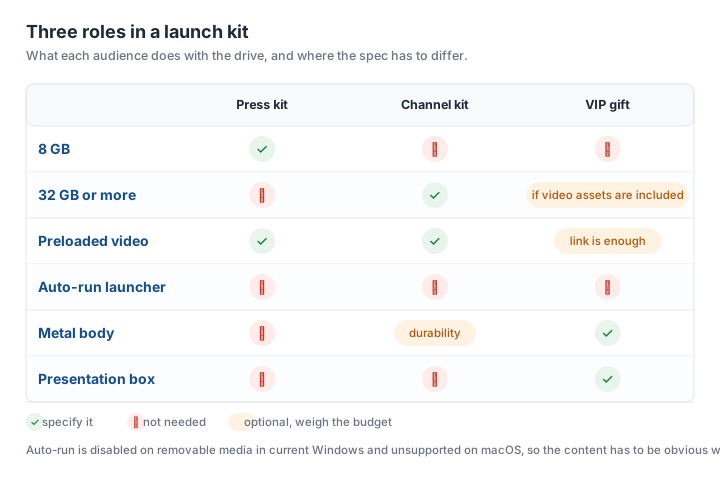
The press drive exists to be opened within minutes, on a machine you do not control, by someone who will not read instructions. Its job is to put the embargoed assets, the press release and the images in front of a journalist without friction. Small capacity, plain body, ruthless clarity of file structure.
The channel drive carries the material a reseller needs to sell: price lists, POS artwork, training video, spec sheets. It gets plugged into a Windows laptop in an office. Capacity matters here because video assets are large.
The VIP drive is a gift, and the object is the message. Packaging, body material and finish carry more weight than capacity, and the content is often secondary to the physical impression.
Capacity and speed by audience
Press kits rarely need more than 8GB. A press release, twenty press images at print resolution, a logo pack and a two-minute video land well under that. Buying 32GB for the press list is the most common overspend in a launch order, and it buys nothing the journalist will notice.
Channel kits are the opposite. A training video plus POS artwork plus a price book can pass 8GB in a single update, so 32GB is the working size, and the drive has to actually deliver the files at a usable rate. USB 2.0 moves roughly 10 to 20 MB/s in practice, which means a 4GB video takes something like four to seven minutes to copy — acceptable for a reseller, painful at a press desk with a deadline.
One number worth putting on the brief: a nominal 32GB drive reports about 29.8GB usable in Windows, because flash capacity is sold in decimal units and reported in binary ones. If your content package is planned to fill '32GB', it will not fit.
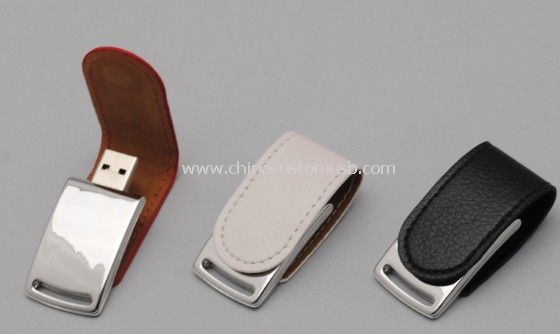
For the VIP tier, capacity is a side note — 16GB or 32GB is enough for the assets, and the budget is better spent on the body and the box. A leather-wrapped body takes a debossed logo, hides handling marks that show on gloss, and reads as a gift rather than a giveaway. Most of our corporate gift USB drives sit in that tier: leather, metal, boxed.
Preloading: why autorun is dead, and what goes at the root
Every launch brief we receive asks for the same thing: the video should start automatically when the drive is plugged in. That has not been reliable for over a decade. Windows stopped auto-running programs from removable media with the Windows 7 era security change, and macOS never supported it. Any supplier who says otherwise is either working from an old template or planning to ship a launcher that will be blocked on the journalist's machine.
What works instead is making the content impossible to miss:
- One HTML index file at the root, opening in any browser, with three large links: video, images, press release. No JavaScript framework, no external fonts.
- Flat structure. Two folder levels maximum, because a journalist will not dig three levels down on a laptop trackpad.
- File names with no spaces, no slashes, no colons and no accented characters — those are the characters that break on a machine with a different locale.
- The video also supplied as a plain MP4 next to the index, in case the browser will not play the codec.
Two technical constraints decide the format. FAT32 cannot hold a single file larger than 4GB, and a 1080p launch video often runs 1.5 to 3GB, so the format has to be agreed before production rather than discovered on arrival. If any single file may exceed 4GB, specify exFAT — and accept that a small number of older car players and industrial devices will not read it.
Test the finished folder on a Windows machine and a Mac before the batch is packed. Preloading errors are cheap to fix at that point and impossible once the cartons are sealed.
Packaging that survives shipping and customs
Three packaging decisions come up in launch orders, and only one of them is about looks.
Individual protection first. Every drive in its own bag, master carton divided. A gift box is presentation, not transport protection — the drive still needs its own bag inside it, or the foam insert will scuff the print.
Rigid boxes for the VIP tier, sleeves for the rest. A printed cardboard sleeve over a plain box is the cheapest way to make a press kit look considered; a rigid box with a foam cut-out is what the VIP tier expects.
Customs paperwork matched to what is inside. USB flash drives fall under HS 8523.51 as solid-state storage, and the declared description should say so. Two things delay launch shipments: a creative declaration that describes the drive as something else, and preloaded software the shipper has no distribution rights for. Preload the assets you own or are licensed to distribute, and list the content on the commercial invoice if it is not your own material.
For EU deliveries, the drives are electronics: CE and RoHS marking and the accompanying declaration need to be in order before the cartons leave, not negotiated at the border.
Mixing three SKUs in one production run
The good news is that three specs do not mean three separate orders. They can be scheduled as one run, but each spec clears its own minimum, because a different body, a different print and a different packaging format are three separate setups on the line. Three SKUs of 1,000 each is not one order of 3,000 for pricing purposes — it is three smaller runs that happen to share a shipping date.
What genuinely saves money is alignment: same body across press and channel kits with different print, same packaging across all three, and one preload folder structure reused rather than rebuilt per audience. That keeps the setup count down and keeps the files consistent.
What genuinely costs money is a late change. Once packaging is printed, a new quantity split is a reprint, and once drives are sealed, a preload correction is a rework.
Send us the launch date, the three quantities and the content package size, and we will come back with a configuration per tier plus a production slot that fits the date. Send us your launch date and we will confirm a production slot.
Need custom USB drives for your next project?
Factory-direct pricing, free digital proof and a 7-day sample turnaround.
Get a free quote