Locked or Unlocked Preload: What a Read-Only Volume Stops, and What It Does Not
A locked preload and an unlocked preload are not two security levels of the same product. They answer two different questions. Locking answers can the recipient damage these files by accident, and it answers that well. It does not answer can the recipient take these files, because any file that opens can also be copied. Decide which question your client is asking before the purchase order is written.
Three Places a Preload Can Be Locked
Buyers say locked and suppliers hear three different things. On a custom USB drive there are three separate places where a write can be refused, and they sit at different levels of the hardware.
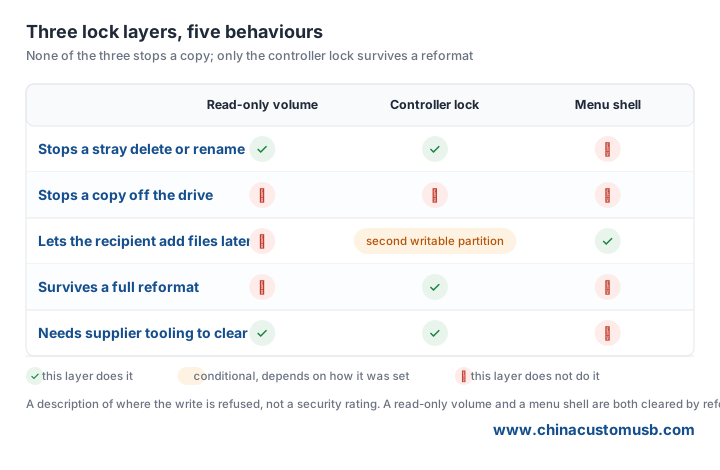
Read-only volume. The factory writes the data, then marks the partition or the whole volume read-only at file-system level. The drive still mounts on Windows, macOS and Linux as an ordinary disk, the folder tree looks normal, and every write attempt comes back as an access-denied error. It is a software flag, so it travels with the volume: a reformat or a partitioning tool clears it, and the files are editable again. That is enough for most corporate deliveries, because the recipient has no reason to reformat a drive they were given.
Controller setting. The lock sits in the flash controller firmware instead of the file system. The controller is what reports the drive to the host as fixed or write-protected, so the flag survives an operating-system reformat on the recipient side and can only be cleared with the supplier tool that set it. Some controllers also expose a second small partition that stays writable while the main volume does not, which is the practical way to give a client a read-only catalogue plus a folder for their own notes. Ask for the controller family in writing, because the phrase does not mean the same thing across the common chips.
Menu shell. The data is not locked at all. What is locked is the entry point: the drive opens on a branded HTML menu instead of a file listing, and that menu has no delete, rename or drag-and-drop. This is the weakest of the three and the least durable, because the recipient can still open the folder directly and the shell disappears the moment the volume is reformatted. Treat it as a presentation choice, not as protection.
Unlocked Preload: When the Recipient Should Keep Adding Files
Unlocked is the right default more often than buyers expect. The pattern that needs it is a drive that keeps working after delivery: a distributor adding local price sheets, a sales team dropping a client deck next to the master catalogue, a training department adding a module each quarter without ordering new drives.
There are two costs to unlocked and both are manageable. The first is confusion rather than damage: without a named master folder and a dated subfolder convention, a shared drive turns into a pile within a month, so fix that in the folder structure instead of the lock. The second is drift, where a client edits the master file instead of adding beside it, which a dated file name and one line in the covering email mostly prevents.
What Read-Only Actually Stops, and the Copy That Still Works
Be explicit with the client about that boundary. A read-only volume stops the four things that actually ruin a preload in the field: a stray delete, a rename that breaks a shortcut or a menu link, an overwrite of one file by another of the same name, and a sync client or an infected machine writing into the folder.
It does not stop copying. Anyone who can open a file can save it to a local disk, and no drive-level flag changes that. If the requirement is that the catalogue must not reach a competitor, a read-only build will not deliver it and should not be quoted as if it would; a documented obligation on the recipient, or keeping the sensitive content off the drive and shipping a link, is what does.
Matching the Mode to the Delivery
Product catalogues and price lists. Read-only. The value is that the numbers the client quotes from are the numbers you published, and a locked volume removes the argument about which version they were reading. Add the volume label with the year so two generations on the same desk can be told apart.
Regulated documents and certificates. Unlocked. A safety data sheet, a test report or a declaration of conformity is something the recipient files inside their own quality system. Locking those files creates work for the client and buys nothing, because the documents are public to anyone who asks.
Sales kits that get personalised. Unlocked, with a clear master folder. The rep will add a client-specific quotation and a photo of the sample; a read-only volume forces a second copy elsewhere, and the second copy is the one that goes stale.
Tender and audit submissions. Read-only with a unique volume label. Two bids for the same project often sit on the same desk, and the label plus the folder date is what separates them at the point of opening.
What to Put in the Order
The lock decision is worth one line each on the purchase order, and the lines that prevent most disputes are these:
Lock mode, named at the level. Write read-only volume, controller write-protect or menu shell only — never just locked. The three carry different tooling and different prices, and a supplier told locked will pick the cheapest one that matches the word.
Volume label. Decide it before the write pass rather than after. Keep it to eleven characters, upper case, no spaces, and make it carry the year and the audience: CATALOG26EU reads better on a client desk than USB DISK, and it is the only thing visible in a file dialog.
A test file and a mount photo. Ask for a photo of the finished drive mounted on a normal PC, with a write attempt failing, next to the folder listing. "Locked: yes" on an invoice has never settled a dispute; a screenshot of the error has.
A re-check before packing. The write pass and the lock are two operations, and the second is easy to skip on a rush order. Put a line in the inspection sheet saying the drive was mounted after locking and a test write was refused, signed by the person who did it. On a mixed order, pack locked and unlocked drives in separate cartons with the mode on the outside label.
What happens on reorder. A locked build is reproducible only if the supplier keeps the folder image and the controller setting on file. Ask whether they do, and for how long. If they do not, every reorder starts from your source folder again and the second generation will not match the first.
Send us your folder list and say whether the recipient should read only or keep adding files. We will quote a locked build and an unlocked build side by side, on the same drive body, so the difference in price and lead time is visible before you choose.
Need custom USB drives for your next project?
Factory-direct pricing, free digital proof and a 7-day sample turnaround.
Get a free quote