Preloaded USB Drives for Trade Shows: What to Load, Lock and Label
A preloaded trade show drive fails in one of three places, and none of them is the flash chip. The files are too heavy to browse on a borrowed laptop; the recipient cannot find them because the folder tree assumes somebody will read a printed index; or the drive comes back to the booth with a renamed folder and a scratched logo. All three are decided on the purchase order, weeks before the booth opens.
What Earns a Place on the Drive
Three documents and one folder is the working limit for a handout drive. Everything else crowds the first screen the recipient sees.
The catalog. Export the screen version, not the 300 dpi press file. A twelve page catalog at 150 dpi lands between 6 MB and 10 MB; the press file is four times heavier and prints no better on the office printer the recipient will use.
One video, under 90 seconds. H.264 in an MP4 container at 720p and roughly 4 Mbps gives about 45 MB for a 90 second clip, and both Windows and macOS play it with no added codec. Do not ship MOV, which needs QuickTime, and never ship an EXE launcher: it reads as a security risk and nobody runs it.
One spec sheet. The single page answering capacity, interface, print method, minimum quantity and lead time. Keep a dated price list out of the preload and point to a page on your site, because a drive gets reused for two years and old prices generate complaints.
One folder that opens first. Name the files so they sort in reading order: 01_Catalog, 02_Demo, 03_Specs. Leading digits sort better than adjectives. Keep names under about 40 characters, use underscores instead of spaces, drop accents, and hold the whole preload under 150 MB on a 4 GB drive so the recipient can still reuse it.
Pick a Body That Survives a Booth Bag
At a show the drive is handled more in three days than in the rest of its life. A card body slides into a badge holder and comes back out at the office. A capped stick disappears into a bag pocket and loses the cap.
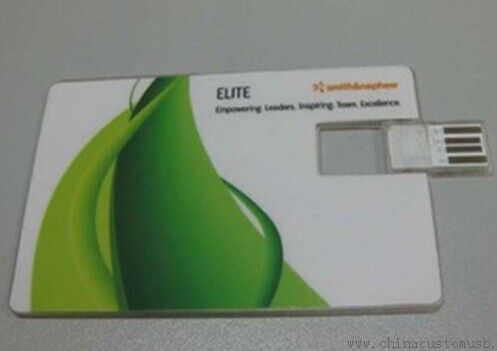
Print area is what you are really buying. A capped stick gives a barrel band of roughly 25 by 12 mm, which is a one colour logo and nothing else. A card body gives most of an 85.6 by 54 mm face, enough for a logo, a booth number and a one line message.
Locking: Pick the Layer Before Anyone Copies the Files
Four production configurations enforce different things, and none prevents a recipient from copying the files out, because a file that opens can be saved. What a lock buys is protection against accidental damage: a deleted folder, a renamed file, a drive used as a scratch disk mid-show.
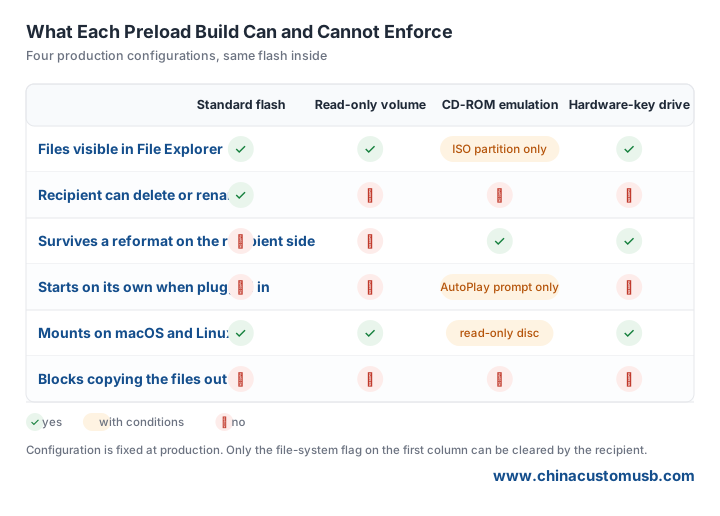
Read-only volume. The factory writes the data and marks the volume read-only at file system level. The drive mounts normally on all three desktop systems and every write attempt returns an access error. It is a flag, so a reformat clears it — enough for a corporate handout, since nobody reformats a drive they were given.
Controller level lock. The flag lives in the flash controller instead of the file system and survives a reformat. Ask for it when the content is contractual: a spec sheet with tolerances, a compliance pack, a priced catalogue for a distributor.
CD-ROM emulation. The drive presents a fixed ISO partition as an optical disc, which a reformat cannot undo. macOS mounts it as a read-only disc; Linux behaviour varies by kernel and is worth testing. A hardware-key drive puts a password in front of the volume, which is rarely justified for a handout, because a drive that asks for a password before showing content gets put down.
The decision rule is the shelf life of the content. If you re-issue next season, stay unlocked and collect the old drives, because a locked drive you cannot rewrite is scrap. If the content is dated or priced, lock at controller level and print the fact on the order.
Volume Labels, Drive Icons and Serial Numbers
The volume label is the name the drive shows in File Explorer and in the Finder sidebar. On FAT32 it is capped at 11 characters, and FAT32 is still the safest giveaway format because it mounts everywhere. Plan the label to fit 11: a show code, a booth, a year. CTN-P2-26 fits; Canton Fair Phase 2 Booth 26 does not.
A custom drive icon is a small autorun.inf file at the volume root pointing at an .ico file. Windows honours the icon line even with autorun execution disabled, provided the .ico sits at the root; macOS ignores it, so never let the icon be your only brand surface. Test on a clean Windows machine.
Print a unique serial on each drive, or a QR resolving to the same number, and keep the mapping file. The serial names the batch and the content version when a drive comes back three months later, and it blocks the shortcut of topping up a short shipment with last season drives that still hold last season prices.
A Pre-Show Checklist With Deadlines
Four weeks out: freeze the content and send a manifest listing every file name, its size and a checksum. The checksum is the cheapest proof that the file on the drive is the file you approved.
Two weeks out: approve a physical proof — a loaded drive in your hand plus the printed face, not a PDF of the artwork. Colour on a printed card body shifts at arm length.
One week out: bulk arrives and you test a sample, not the carton. Open three files from each of ten drives, check the volume label, confirm the read-only flag if you ordered one.
Two days out: plug one drive into each laptop that will be at the booth, on both systems if the team mixes them. A drive that works on the office desktop and not on the borrowed booth laptop can only be fixed before you travel.
Seven Fields to Put on the Order
Capacity; configuration, named as read-only volume, controller lock, CD-ROM emulation or hardware key; volume label within 11 characters; the content manifest with checksums; print method and number of colours; packing, poly bag or bulk carton; and the delivery window with booth number and a named person who signs off the files. Suppliers quote from what is written, so an unwritten requirement is an assumption on both sides.
Send the show date, the file set you plan to load and the capacity you are considering. We will quote a card body and a capped stick side by side, load a sample with your files and ship it for sign-off before the production window closes.
Need custom USB drives for your next project?
Factory-direct pricing, free digital proof and a 7-day sample turnaround.
Get a free quote