MLC vs TLC vs QLC NAND for Custom USB Drives: What 2, 3 and 4 Bits per Cell Change
Two quotations that both say "TLC" can differ by a wide margin per unit, and the difference usually is not the cell type at all. Cell type — 2, 3 or 4 bits stored in each NAND cell — is one of four variables that decide what a bulk order actually behaves like. This piece isolates that one variable: what MLC, TLC and QLC change about write speed, rewrite tolerance and the unit price you are quoted, and what can be verified on a sample before the balance leaves.
What the Cell Type Decides Before Chip Grade Enters the Conversation
A NAND cell holds charge, and a controller reads that charge back by comparing it against fixed voltage thresholds. The number of thresholds is what sets bits per cell. MLC resolves 4 levels and stores 2 bits. TLC resolves 8 levels and stores 3 bits. QLC resolves 16 levels and stores 4 bits. On the same die area, a TLC die therefore holds 1.5 times what an MLC die holds, and a QLC die holds twice as much.
That single geometric fact drives everything downstream. More bits per die area means fewer die per wafer and a lower cost per gigabyte. It also means each level is separated by a narrower voltage band, so the controller has to work harder to place a write and to recover a read, and a program operation takes longer because the cell has to be driven to one of 16 targets instead of 4.
Cell type sits upstream of three other variables that buyers often conflate with it: the die grade (an original wafer, a downgrade, or a re-marked part), the controller model, and the firmware the factory flashes. A quotation that names only the cell type has named one of four things.
Two, Three or Four Bits per Cell: Which Step Costs You Rewrites
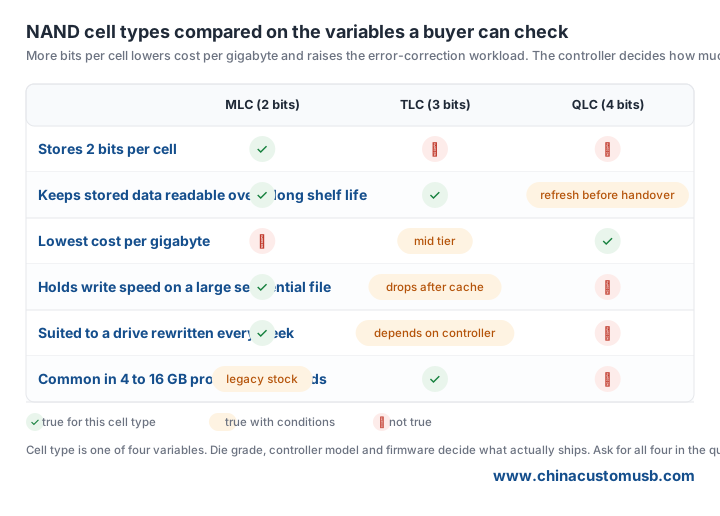
Every cell can be erased and rewritten a finite number of times before the oxide that traps the charge degrades. Because narrower margins leave less room for that degradation, the program-erase budget falls as bits per cell rises: MLC holds the largest budget, TLC the middle, QLC the smallest. The step from 2 to 3 bits costs more than the step from 3 to 4, which is part of why MLC has largely left the small-capacity market and TLC became the default.
What matters for an order is not the raw budget but the rewrite load the recipient will put on the drive. A drive that ships with a preloaded catalogue and is read once at a trade show burns almost nothing. A drive that a field engineer keeps syncing a working folder onto every week burns the budget steadily, and it also has to survive being unplugged mid-write, dropped, and left in a hot vehicle.
Write Speed and the Small-File Penalty in a Giveaway Batch
Two numbers get confused at the quotation stage. One is the peak write rate a drive reaches while it is writing into its fast cache area. The other is the sustained rate it falls back to once that area is full. Promotional drives are usually quoted on the first number, because a short benchmark only fills the cache. A single file larger than the cache exposes the second, and that is the rate that shapes a factory preload schedule.
The gap widens with bits per cell, because writing into a QLC cell takes longer than writing into a TLC cell on the same controller. It also widens with file count. Preloading two thousand small PDFs costs materially more per gigabyte than preloading one large video file, on any drive, because of the per-file overhead — and on a drive with a lower sustained rate that difference turns into extra days in the production window.
Three checks on a sample will settle the claim. Run a full write-read-verify pass and record the sustained rate rather than the first thirty seconds. Copy a single folder larger than the cache and watch where the rate settles. Read the controller and NAND part numbers off the drive with a utility that reports them, then compare those numbers against the quotation. If the paper says TLC and the drive reports a higher density part, the conversation has changed.
Where QLC Is Enough and Where It Becomes a Return Risk
QLC is a density choice, not a defective one, and it fits work where the drive is written once and read many times: a media kit, a product catalogue, a software installer, a conference handout with a fixed deck and a few videos. At a fixed budget per unit, QLC buys more capacity than TLC does, and for that use the extra capacity is worth more than the rewrite budget the buyer gives up.
It becomes a return risk when the recipient treats the drive as storage rather than as a delivery. Narrow margins mean less tolerance for a drive that sits unpowered for months, for a hot glovebox, or for repeated deletion and rewriting of a working folder. The failure does not look like a dead drive. It looks like files that open slowly, then a folder that will not open, which the recipient reports as a bad batch.
Two controls reduce that risk without changing the cell type. Verify the preloaded content on the drive after writing and before packing, rather than verifying the master image on the server. And state the intended use on the packaging or the insert card, so the recipient does not adopt the drive as a backup target.
Four Questions to Ask a Supplier Before You Accept a NAND Claim
Ask these in writing, inside the quotation, not in a chat thread. Each one has an answer that can be checked later against the sample.
Which cell type, and which NAND part number? The part number is what lets a third party confirm density and grade; a cell-type word on its own cannot be checked.
Which controller model, and was its firmware tuned for that cell type? A high-density die running on a controller designed for a lower-density part is the configuration that produces slow writes and early read errors.
Is the die original, a downgrade, or a re-marked part? This is the question that separates a cell-type discussion from a die-grade discussion, and it moves the price further than the cell type does.
What is the read-back procedure before packing? Full-surface verify and a spot check of a few folders are different promises, and just one of them catches a bad die before it ships.
Next step. Send the capacity, the quantity, and what the drive will actually carry — a preloaded catalogue read once, or a working folder that gets rewritten — and we will quote MLC, TLC and QLC options side by side, so the price gap and the rewrite budget sit on the same line.
Need custom USB drives for your next project?
Factory-direct pricing, free digital proof and a 7-day sample turnaround.
Get a free quote