What Capacity USB Drive Do You Need? 4 Checks Before You Order
Order the capacity before you order the drives. A 10,000-piece trade-show handout whose only payload is a PDF catalogue fits comfortably on 8 GB, and paying for 64 GB adds real money to the invoice for space nobody will use. The opposite mistake costs more: a 20 GB event reel loaded onto a small, cheap drive will not copy or play when a recipient needs it. Four checks below size a bulk USB order so you pay for storage people can actually use, not a number printed on a sticker.
1. Size the File Set Before You Pick a Capacity
Open the folder you genuinely intend to load and read its total size from your file manager. Add the files that are going on the drive, not the files you might add later. A text catalogue, a price list and a handful of PDF sheets usually land well under 500 MB, which leaves even an 8 GB drive with room to spare. A single 1080p product video commonly runs 2-4 GB depending on bitrate and length. A photo set from one event can be 1-3 GB; a long-form 4K master or a full wedding reel reaches 20 GB or more. Write the real total in gigabytes, then round up to the nearest standard capacity. This one step prevents most of the wrong-capacity orders suppliers see, because buyers tend to picture the drive and forget the files.
Be explicit about who receives the drive. A handout that carries a brochure has a very different payload from a drive that ships a software installer, a CAD library or a training video archive. Name the largest single file as well as the folder total, because a single oversized file can fail on a drive whose total capacity is otherwise sufficient. That detail matters again in check three.
2. Why the Cheapest Large Drive Fails on Video
Capacity on a label says nothing about sustained write speed. Two drives both marked 64 GB can behave very differently when a long video is being copied to them. A drive quoted only by peak read speed may drop well below the bitrate of the file during a sustained write, which shows up as stutter, a failed copy or a file that will not play back from the drive. Before you approve a large-capacity quote for video content, ask the supplier for the sustained write figure and the NAND tier, then test with the actual file: copy the real video to a sample drive, time the transfer, and play it straight from the drive on the same class of computer your recipients will use. If the copy stalls or playback breaks, the capacity is not the problem and a bigger drive will not fix it.
This is not an argument for the most expensive option. It is an argument for matching the drive to the payload. For PDFs and documents, sustained write is rarely the limiting factor, and a modest drive is the correct, economical choice. For video, verify the write path first and only then compare unit prices across the shortlist.
3. Leave 20 Percent Headroom on a Bulk Order
Advertised capacity is not the space you get. After formatting, a drive reports less than the number on the shell, and file-system overhead takes a little more. On a bulk order where you cannot inspect every unit before it ships, build in roughly 20 percent headroom above your measured file total. If the folder is 16 GB, do not buy 16 GB; step up to the next capacity. Headroom also absorbs the small additions that always arrive late — a revised price sheet, an extra clip, a second language on the catalogue — without forcing a re-order.

The single-file limit is the other half of this check. Drives formatted to FAT32 reject any individual file larger than 4 GB even when free space remains. If the payload contains a long 4K file or a disc image, confirm the file system before the order: exFAT removes that ceiling and is read by modern Windows and macOS systems, but verify it is acceptable on the machines your recipients actually use. A capacity choice that ignores the file system is a return waiting to happen.
4. A Capacity Fit Table for Common File Sets
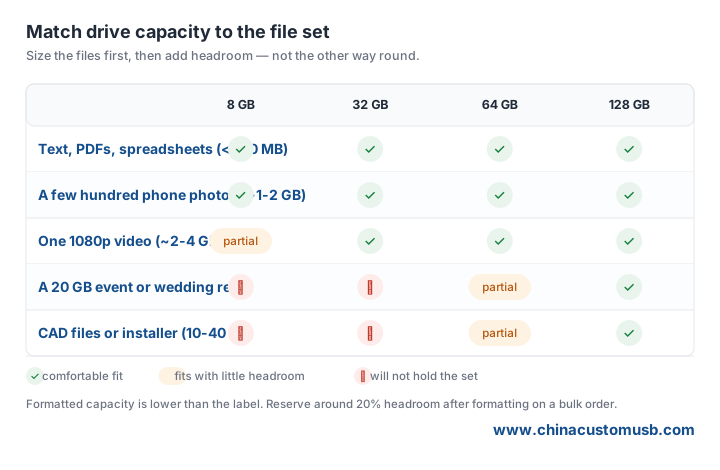
The table below maps typical payloads to the capacities that hold them comfortably. Read it with your measured file total in hand: the green cells are comfortable fits, the amber cells hold the set but leave little margin, and red cells will not hold it at all. It assumes formatted capacity and a FAT32 single-file ceiling where relevant.
5. When a Bigger Drive Costs More Than It Saves
Unit price rises with capacity, and on a large order that step is multiplied by every piece. Paying for 64 GB when 16 GB covers the files with headroom is money spent on empty silicon. The practical method is to price two adjacent capacities for the same shell and print, then compare the delivered total against the payload you measured. If the lower tier clears the 20 percent headroom and the single-file limit, take it. If the higher tier avoids a likely re-order or a playback complaint, the difference is usually worth paying. Decide from the file set, not from a rule of thumb.
Once the capacity is settled, lock the spec in writing: capacity, file system, sustained write requirement for video payloads, shell and print artwork. Send us your file total and we will recommend the smallest capacity that carries it with headroom and quote the sample and bulk tiers side by side. Explore our gift USB drive range and request a free sample and quote to confirm the fit before the full order.
Need custom USB drives for your next project?
Factory-direct pricing, free digital proof and a 7-day sample turnaround.
Get a free quote